n·namasteMEETINGSStart a conversation ↗

INTERACTIVE FLAT PANELS · OFFICE MEETING ROOMS · INDIA

MAXHUB interactive flat panels
for offices in India.

Compare MAXHUB interactive panels for boardrooms, project discussions and hybrid meetings in Indian offices. Start with how people will present, write and join calls, then choose the screen and complete room setup.

Updated · Namaste Meetings · About this guide’s publisher

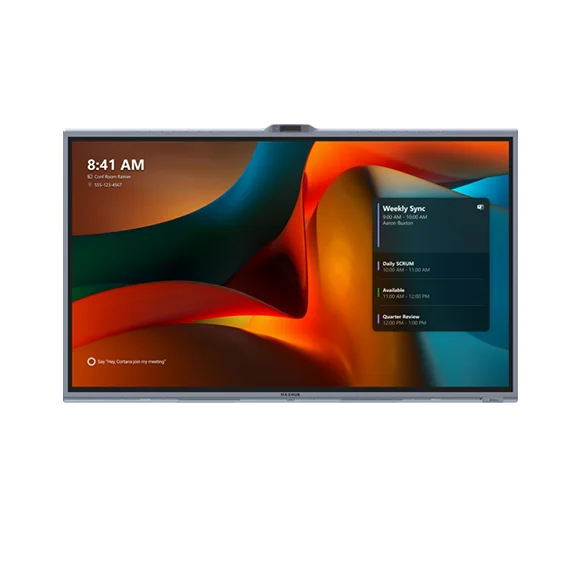
MAXHUB XBoard V7 interactive collaboration display
MAXHUB product photograph. Confirm the exact India model and package contents in your quotation.

CHOOSE THE WAY THE ROOM WILL WORK

V7 or V7 MTR?
Start with the meeting.

An interactive flat panel is a large touch display for presenting, annotating and working on a shared whiteboard. The room’s meeting workflow determines the wider system you need.

Keeping an existing display? Compare MAXHUB video conferencing bars for the camera-and-audio part of the room.

Standard XBoard V7
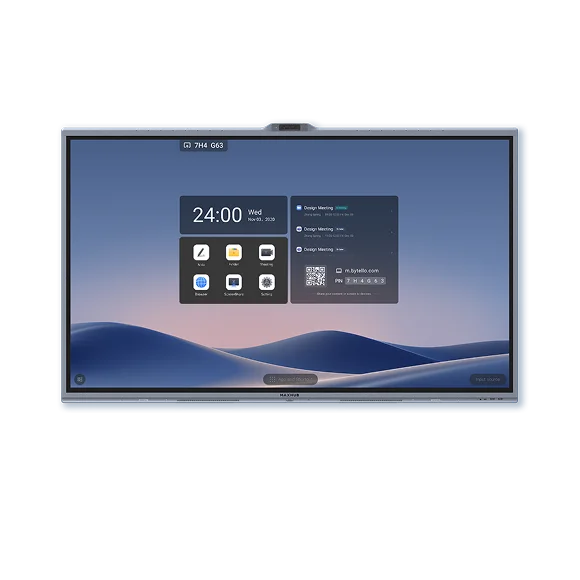
Shortlist it for presentations, whiteboarding and collaboration using Windows-based MAXHUB OS. For the standard V7 India configuration, include the required MT71E OPS PC module as a separate quote line.
XBoard V7 MTR
Shortlist it when IT wants a dedicated Microsoft Teams Rooms workflow. Confirm the exact India model, compute, console, room account and licences; the standard V7 specification does not establish the MTR package.
Before deciding
Walk through a normal meeting and a guest presentation with IT and the people who use the room. Agree how the call starts, how content is shared and who manages the system.

TWO CONFIGURATIONS. DIFFERENT WORKFLOWS.

Compare MAXHUB V7.
And V7 MTR.

Standard V7 and V7 MTR are separate configurations. Match the complete setup to the meeting app you use and your IT requirements.

Product details come from the linked product references and manufacturer datasheets. The photographs show product references; they do not establish stock, included accessories or an installed customer project.

55, 65, 75 OR 86 INCHES?

Choose for the content.
Test from the farthest seat.

Standard V7 is listed in 55, 65, 75 and 86-inch sizes. A seat count alone cannot determine the right panel: table depth, viewing distance and the detail people need to read matter too.

For V7 MTR, use its own size-specific datasheet and confirm the exact India model. Check standard V7 datasheets or check V7 MTR datasheets.

  1. Measure the viewing positions.Record the wall area, table layout and the distance from the intended display to the farthest viewer. Check the chosen model’s outer dimensions and mounting requirements.
  2. Use the material your team reads.Try a real spreadsheet, presentation and shared whiteboard. Ask someone at the farthest seat to read the smallest detail they need for the discussion.
  3. Check the room in normal conditions.Assess reflections with the usual lighting and blinds. Include seated viewing, standing interaction and a remote colleague’s view of shared content.
  4. Agree the evidence before ordering.Record the proposed size, test content, viewing positions and any limitations. Keep screen selection separate from camera, microphone and installation checks.

WHAT AFFECTS THE COMPLETE PROJECT COST?

Compare the whole quote.
Then agree the handover.

Ask for a bill of quantities, or BOQ, with separate lines for the panel model and size, the required compute, controls and accessories. For standard V7, the mandatory MT71E OPS module must be quoted separately.

Other scope factors include wall or trolley mounting, power and network points, cable routes, meeting software and licences, installation work, user orientation and the agreed service arrangements. Ask the partner to state what is included, what is extra and any applicable taxes.

For a single office or a multi-city project, agree supply, installation and support for each site. A model listed here does not confirm local stock or an installation date.

Prepare a complete quote request ↗

Download the room-test scorecard ↓

Explore MAXHUB enquiries in Mumbai ↗
ACCEPTANCE CHECKLIST FOR THE ROOM

  1. Confirm the supplied configuration.Match the panel and module model codes, screen size, controller, mounts and accessories to the agreed BOQ. Record who owns the room accounts and licences.
  2. Start a normal meeting.Test the agreed laptop or dedicated-room workflow, content sharing and guest connection. Confirm that the intended users can repeat the process after handover.
  3. Check touch and remote participation.Try annotation and whiteboarding, read shared content from the farthest seat, and have a remote colleague assess the camera view and voices from intended seating positions.
  4. Leave with a support record.Ask for the final settings, relevant manuals, installation handover and a named support route. Record outstanding issues and agree the next action before acceptance.

KEEP THE DECISION INFORMED

Useful reading.
Practical next steps.

Use the guides below to choose a setup and prepare a clear quote request.

INTERACTIVE PANEL BUYER QUESTIONS

Before you finalise the room.

Should I choose an interactive panel or a video bar?

Choose around the task. An interactive panel supports touch-based collaboration and a shared canvas. A video bar provides camera and audio alongside a display and meeting workflow. If you are keeping an existing screen, start with the video bar comparison; if people need to write and work on the shared screen, compare the XBoard configurations here.

What is the difference between standard V7 and V7 MTR?

Standard V7 is the Windows-based MAXHUB OS collaboration configuration. V7 MTR is the dedicated Microsoft Teams Rooms offering. Confirm the exact India model, compute, console and licences for the selected workflow instead of treating the two product names as interchangeable.

Is the MT71E OPS module included with standard V7?

No. The standard V7 India configuration needs the MT71E OPS PC module, quoted separately. Ask the quotation to identify it explicitly along with the panel, mounting, cabling and software scope. See the standard V7 product page and its size-specific datasheets.

Which panel size should I choose for my office?

Standard V7 is listed in 55, 65, 75 and 86-inch sizes. Measure the viewing distance and test your real content from the farthest seat; do not choose only by the number of chairs. Check the selected panel’s dimensions, room lighting and mounting plan. Use the screen-size test plan before confirming the model.

Is an interactive flat panel the same as a smart TV?

A conventional smart TV is mainly a display for viewing content. An interactive flat panel adds touch input for activities such as writing, annotation and shared whiteboarding. Check which software and computer the intended work needs; neither a screen nor touch capability alone confirms a complete video conferencing setup.

Can remote colleagues see and work with the whiteboard?

That depends on the meeting software, content-sharing method and room configuration. Ask for a demonstration of the exact workflow: someone writes in the room, a remote colleague views or contributes as required, and the team saves or clears the work. Confirm any accounts, licences and permissions before choosing the setup.

FROM A SHARED SCREEN TO A BETTER ROOM

Bring your ideas.
We’ll start with your room.

Tell us your project city, meeting platform and the way your team wants to work together.

Request a panel quote ↗

A CLEARER START / ACROSS INDIA

From Mumbai to Jodhpur. A clearer start.

Tell us what the room is for. A good plan starts with the people who will use it.

  1. Measure the room and note how many people will sit in it.
  2. Tell us which meeting app or laptop you use.
  3. Ask for the equipment, installation and support scope in writing.
Plan your room ↗

Supply, installation and service are confirmed for your site after an enquiry.

WhatsApp